 A datito of Jimena.
 As she says, "is a YouTube for Powerpoint presentations of excellent quality, com possibility to comment on each slide of the presentations and the code to put in your blog, appearing in video format where you go from slide to slide" .
I found it very interesting data and it is Slideshare.
should only enter the site , then the first thing you need is an invitation to access the service. If you have not come at the invitation should click on "request an invitation here." (If you click on the image below you can see the larger)
 then request information such as name and e-mail and then click "Send." Displays a warning that says it will approve your application as soon as possible.
 Then you must open your mail and click on the link I sent.
you ask for a username and password. And after that, and you can begin using them.
I think it's an interesting tool, especially for teachers who have blogs with their students.
To upload a power point that we have in our computer must click "upload". Looking for the file to your computer with the browse button, put a title and then click "upload". We show that
is ready in this way ... (I did a test powerpoint)
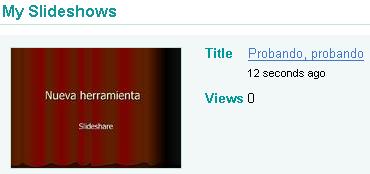 If you click on the title of the slide, in this case, "Testing, testing", they will open another window that will give you the code to put the powerpoint on your blog and also the URL link, ie the web address from where you can see his powerpoint that has already been uploaded to the Internet so that you can see who wants it.
 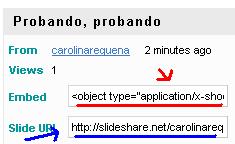 I copied the code and pasted it in my sidebar for a while for you to see ... And then there's this
 LINK to see the powerpoint test for the occasion.
EYE! That may be very large. In this circumstances should change the width and height yourself in the same powerpoint code given to them, increasing and decreasing the number of each code here:
 Salu2
Salu2 And thanks Jime


0 comments:
Post a Comment